> For the complete documentation index, see [llms.txt](https://sonity.gitbook.io/docs/llms.txt). Markdown versions of documentation pages are available by appending `.md` to page URLs; this page is available as [Markdown](https://sonity.gitbook.io/docs/integrations/playmaker-integration.md).

# PlayMaker Integration

How to enable and use the PlayMaker integration in Sonity

Playmaker integration made by [Simon Palmblad](https://simonpalmblad.github.io/)

<div align="left"><img src="https://3478075546-files.gitbook.io/~/files/v0/b/gitbook-x-prod.appspot.com/o/spaces%2FECYQ2OSoWTLdq4EUgnCW%2Fuploads%2FtkThOM3REhOQVfkM80Wt%2FIntegrations.png?alt=media&amp;token=ec3811b6-16bf-41b8-9521-85dd40c57eb6" alt="" width="473"></div>

The PlayMaker Sonity integration can be enabled in the [SoundManager Settings](/docs/soundmanager.md#third-party-integrations).\
You also need to install the PlayMaker Unity asset package.\
And add the Script Define Symbol "SONITY\_ENABLE\_INTEGRATION\_PLAYMAKER".\
The free trial version of Sonity doesn’t support this feature because it uses Scripting Define Symbols.\
It is tested and working on PlayMaker version 1.9.8.\
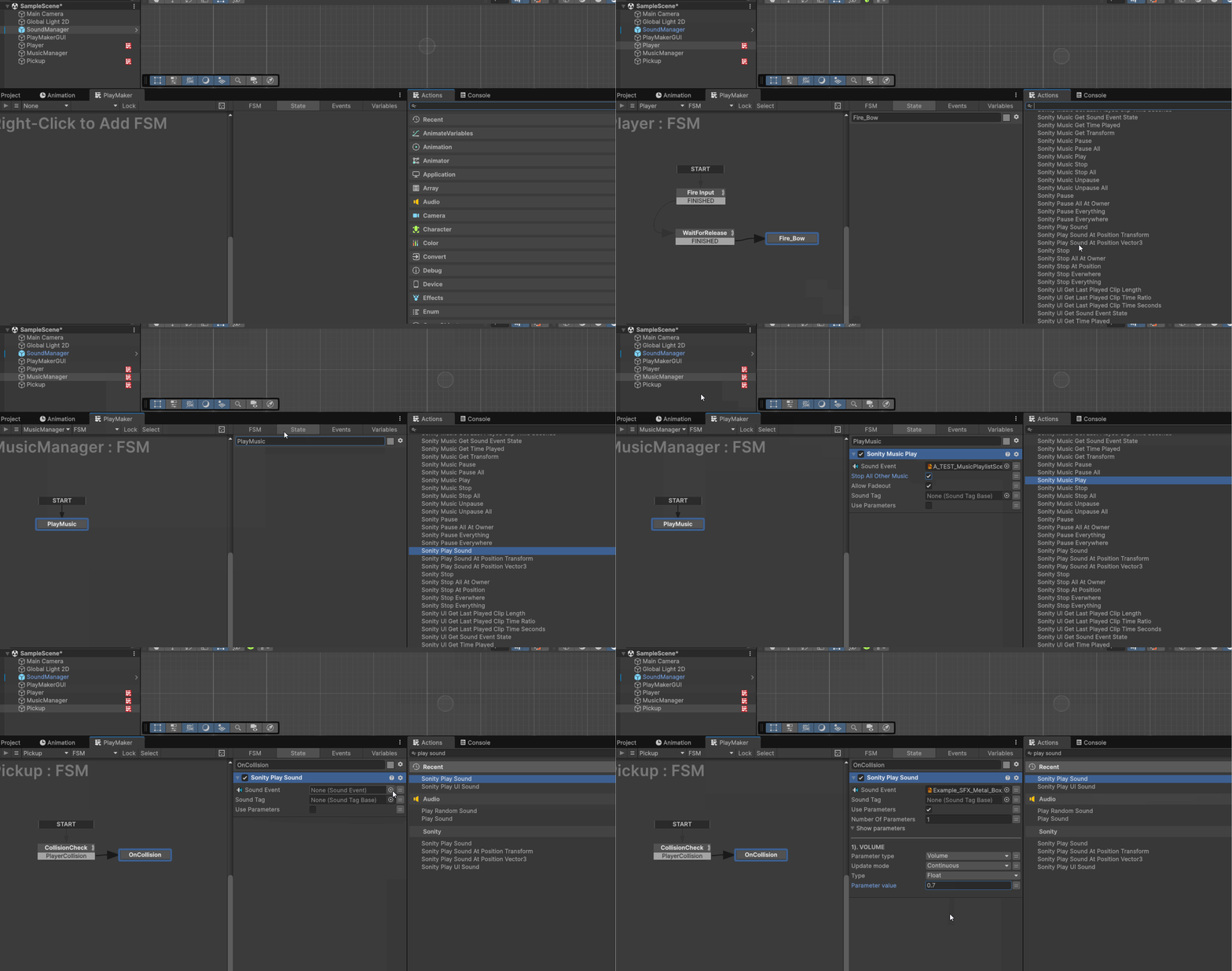
PlayMaker adds easy access to visual scripting.

Example usage:

<div align="left"><img src="https://3478075546-files.gitbook.io/~/files/v0/b/gitbook-x-prod.appspot.com/o/spaces%2FECYQ2OSoWTLdq4EUgnCW%2Fuploads%2F0mBUQwewyqFdG0Xls6pG%2FPlayMaker%20Example.gif?alt=media&amp;token=ac670e47-253f-4586-a123-13e3d96031fb" alt=""></div>

Below is a list of all available PlayMaker actions for Sonity's third party integration.\
Most of this information is also available as tooltips by hovering the Action inside Unity.

### Sonity Play

<table><thead><tr><th width="260.76666259765625">Actions</th><th></th></tr></thead><tbody><tr><td>Sonity Play Sound</td><td>Play the <a href="/docs/soundevent.md">SoundEvent</a> at the position of this GameObject</td></tr><tr><td>Sonity Play Sound At Transform</td><td>Plays the <a href="/docs/soundevent.md">SoundEvent</a> at the position of input Vector3</td></tr><tr><td>Sonity Play Sound At Vector3</td><td>Plays the <a href="/docs/soundevent.md">SoundEvent</a> at the position of the owner Transform</td></tr></tbody></table>

<table><thead><tr><th width="260.36676025390625">Parameters</th><th></th></tr></thead><tbody><tr><td>SoundEvent</td><td>The <a href="/docs/soundevent.md">SoundEvent</a> to play</td></tr><tr><td>SoundTag</td><td>The <a href="/docs/soundtag.md">SoundTag</a> which will determine the Local <a href="/docs/soundtag.md">SoundTag</a> of the SoundEvent</td></tr><tr><td>Vector3</td><td>The Vector3 position to play from.</td></tr><tr><td>Transform</td><td>The Game Object Transform to play the <a href="/docs/soundevent.md">SoundEvent</a> from.</td></tr><tr><td>Use Parameters</td><td>Enables the use of <a href="/docs/soundparameter.md">SoundParameters</a>. For example <a href="/docs/soundparameter.md">SoundParameterVolumeDecibel</a> is used to modify how the SoundEvent is played</td></tr></tbody></table>

<table><thead><tr><th width="275.33331298828125">Actions</th><th width="477.683349609375"></th></tr></thead><tbody><tr><td>Sonity Play Sound</td><td>Play the <a href="/docs/soundevent.md">SoundEvent</a> at the position of this GameObject</td></tr><tr><td>Sonity Play Sound At Transform</td><td>Plays the <a href="/docs/soundevent.md">SoundEvent</a> at the position of input Vector3</td></tr><tr><td>Sonity Play Sound At Vector3</td><td>Plays the <a href="/docs/soundevent.md">SoundEvent</a> at the position of the owner Transform</td></tr></tbody></table>

<table><thead><tr><th width="275.48333740234375">Parameters</th><th></th></tr></thead><tbody><tr><td>SoundEvent</td><td>The <a href="/docs/soundevent.md">SoundEvent</a> to play</td></tr><tr><td>SoundTag</td><td>The <a href="/docs/soundtag.md">SoundTag</a> which will determine the Local <a href="/docs/soundtag.md">SoundTag</a> of the SoundEvent</td></tr><tr><td>Vector3</td><td>The Vector3 position to play from.</td></tr><tr><td>Transform</td><td>The Game Object Transform to play the <a href="/docs/soundevent.md">SoundEvent</a> from.</td></tr><tr><td>Use Parameters</td><td>Enables the use of <a href="/docs/soundparameter.md">SoundParameters</a>. For example <a href="/docs/soundparameter.md">SoundParameterVolumeDecibel</a> is used to modify how the SoundEvent is played</td></tr></tbody></table>

### Sonity Stop

<table><thead><tr><th width="209.16668701171875">Actions</th><th></th></tr></thead><tbody><tr><td>Sonity Stop Sound</td><td>Play the <a href="/docs/soundevent.md">SoundEvent</a> at the position of this GameObject</td></tr><tr><td>Sonity Stop At Position</td><td>Stop the <a href="/docs/soundevent.md">SoundEvent</a> playing at the GameObject Transform.</td></tr><tr><td>Sonity Stop All At Owner</td><td>Stop all <a href="/docs/soundevent.md">SoundEvents</a> playing on this GameObject.</td></tr><tr><td>Sonity Stop Everywhere</td><td>Stop all instances of the <a href="/docs/soundevent.md">SoundEvent</a>.</td></tr><tr><td>Sonity Stop Everything</td><td>Stop the <a href="/docs/soundevent.md">SoundEvent</a> with fadeout. <br>Disabling this stops the sound immediately.</td></tr></tbody></table>

<table><thead><tr><th width="208.1500244140625">Parameters</th><th></th></tr></thead><tbody><tr><td>SoundEvent</td><td>The <a href="/docs/soundevent.md">SoundEvent</a> to stop.</td></tr><tr><td>AllowFadeout</td><td>Stop the <a href="/docs/soundevent.md">SoundEvent</a> with fadeout. <br>Disabling this stops the sound immediately.</td></tr><tr><td>TargetGameObject</td><td>The GameObject Transform on which to stop the <a href="/docs/soundevent.md">SoundEvent</a>.</td></tr></tbody></table>

### Sonity Pause and Unpause

<table><thead><tr><th width="187.2667236328125">Actions</th><th></th></tr></thead><tbody><tr><td>Pause</td><td>Pauses a <a href="/docs/soundevent.md">SoundEvent</a> playing on a GameObject.</td></tr><tr><td>Pause All At Owner</td><td>Pauses all <a href="/docs/soundevent.md">SoundEvents</a> playing on a GameObject.</td></tr><tr><td>Pause Everything</td><td>Pauses all <a href="/docs/soundevent.md">SoundEvents</a> currently playing.</td></tr><tr><td>Pause Everywhere</td><td>Pause all instances of the chosen <a href="/docs/soundevent.md">SoundEvent</a>.</td></tr><tr><td>Unpause</td><td>Unpauses a <a href="/docs/soundevent.md">SoundEvent</a> playing on a GameObject.</td></tr><tr><td>Unpause All At Owner</td><td>Unpauses all <a href="/docs/soundevent.md">SoundEvents</a> playing on a GameObject.</td></tr><tr><td>Unpause Everything</td><td>Unpauses all <a href="/docs/soundevent.md">SoundEvents</a> currently playing.</td></tr><tr><td>Unpause Everywhere</td><td>Unpauses all instances of the chosen <a href="/docs/soundevent.md">SoundEvent</a>.</td></tr></tbody></table>

<table><thead><tr><th width="187.10003662109375">Parameters</th><th></th></tr></thead><tbody><tr><td>SoundEvent</td><td>The <a href="/docs/soundevent.md">SoundEvent</a> to pause/unpause.</td></tr><tr><td>TargetGameObject</td><td>The GameObject Transform on which to pause/unpause the <a href="/docs/soundevent.md">SoundEvent</a>.</td></tr><tr><td>ForcePause</td><td>Pauses <a href="/docs/soundevent.md">SoundEvent</a> even if it is set to "Ignore Local Pause".</td></tr><tr><td>ForceUnpause</td><td>Unpauses <a href="/docs/soundevent.md">SoundEvent</a> even if it is set to "Ignore Local Pause".</td></tr></tbody></table>

### Sonity SoundParameters

[SoundParameters](/docs/soundparameter.md) add an extra layer of control that allows for greater modification of [SoundEvents](/docs/soundevent.md) (e.g. volume, distortion, pitch etc). They can be added when first playing a [SoundEvent](/docs/soundevent.md) and set to update either once when playback starts or to continuously listen for updates.

[Read more about SoundParamters](/docs/soundparameter.md).

#### **Enabling SoundParameters**

By default, [SoundParameters](/docs/soundparameter.md) are not enabled on a [SoundEvent](/docs/soundevent.md).\
Enabling Use Parameters in a Play Action will reveal options to add [SoundParameters](/docs/soundparameter.md) to that event.\
Once enabled, there are several ways of configuring the parameters of a [SoundEvent](/docs/soundevent.md).

{% hint style="info" %}
❕ Note: You can only use one instance of the same type of each parameter, eg: adding 2 [SoundParameterVolume](/docs/soundparameter.md) will only use the last one.
{% endhint %}

![](https://content.gitbook.com/content/ECYQ2OSoWTLdq4EUgnCW/blobs/vce7sI5bp3Wjxg16S8Ua/image99.gif)

{% hint style="info" %}
💡 TIP -  Updating Parameter Values Continuously\
To create a [SoundEvent](/docs/soundevent.md) action with an updatable parameter, set UpdateMode to Continuous and store the ParameterValue in an FSM Variable.\
When you want to update the value just change the FSM Variables and it will automatically update the [SoundEvent](/docs/soundevent.md).
{% endhint %}

<table><thead><tr><th width="198.41668701171875">Options</th><th></th></tr></thead><tbody><tr><td>Use Parameters</td><td>Enable to show <a href="/docs/soundparameter.md">SoundParameter</a> options.</td></tr><tr><td>Number of Parameters</td><td>How many SoundParameters are active on this <a href="/docs/soundevent.md">SoundEvent</a>. <br>Max amount is 8.</td></tr><tr><td>Show parameters</td><td>Fold-out menu to show or hide <a href="/docs/soundparameter.md">SoundParameters</a> in the GUI.</td></tr></tbody></table>

<table><thead><tr><th width="197.2667236328125">Parameters</th><th></th></tr></thead><tbody><tr><td>Parameter type</td><td>Select which <a href="/docs/soundparameter.md">SoundParameter</a> to apply to the <a href="/docs/soundevent.md">SoundEvent</a>.</td></tr><tr><td>Update mode</td><td>Determines if the <a href="/docs/soundevent.md">SoundEvent</a> will take the parameter into consideration only Once at start or if it will be updated Continuously.</td></tr><tr><td>Type [Read only]</td><td>What type of value (float, bool, int) the <a href="/docs/soundparameter.md">SoundParameter</a> takes. The type cannot be set, only read.</td></tr><tr><td>Parameter value</td><td>Value of the <a href="/docs/soundparameter.md">SoundParameter</a> when playing the <a href="/docs/soundevent.md">SoundEvent</a>. Can be a value or an FsmVariable.</td></tr></tbody></table>

### Sonity SoundEvent Info

<table><thead><tr><th width="172.54998779296875">Actions</th><th></th></tr></thead><tbody><tr><td>Get SoundEvent State</td><td>Returns the current SoundEventState of the <a href="/docs/soundevent.md">SoundEvent</a>.</td></tr><tr><td>Get Last Played Clip Length</td><td>Returns the current time (in range 0 to 1) of the AudioClip in the last played AudioSource.</td></tr><tr><td>Get Last Played Clip Time Seconds</td><td>Returns the current time (in seconds) of the AudioClip in the last played AudioSource.<br>Returns 0 if the <a href="/docs/soundevent.md">SoundEvent</a> is not playing or null, and if the Transform is null.</td></tr><tr><td>Get Last Played Clip Time Ratio</td><td>Returns the progress of playback (in range 0 to 1) of the AudioClip in the last played AudioSource.<br>Returns 0 if the <a href="/docs/soundevent.md">SoundEvent</a> is not playing or null, and if the Transform is null.</td></tr><tr><td>Get Time Played</td><td>Returns the time (in seconds) since the SoundEvent was played.<br>Time is calculated using the time scale selected in the <a href="/docs/soundmanager.md">SoundManager</a>.<br>Returns 0 if the <a href="/docs/soundevent.md">SoundEvent</a> is not playing or null, and if the Transform is null.</td></tr><tr><td>Get Contains Loop</td><td>Returns true if any <a href="/docs/soundcontainer.md">SoundContainers</a> in the <a href="/docs/soundevent.md">SoundEvent</a> are set to loop.</td></tr><tr><td>Get Max Length</td><td>Returns the max length (in seconds) of the <a href="/docs/soundevent.md">SoundEvent</a> (calculated from the longest AudioClip).<br>The result is automatically scaled by the pitch of the sound.</td></tr></tbody></table>

<table><thead><tr><th width="173.91668701171875">Parameters</th><th></th></tr></thead><tbody><tr><td>SoundEvent</td><td>The <a href="/docs/soundevent.md">SoundEvent</a> to pause.</td></tr><tr><td>Target GameObject</td><td>The GameObjectTransform on which to stop the <a href="/docs/soundevent.md">SoundEvent</a>.</td></tr><tr><td>Pitch Speed</td><td>Returned value is adjusted by the <a href="/docs/soundevent.md">SoundEvent</a> pitch value.</td></tr><tr><td>Store State In</td><td>FsmVariable to store the returned value in.</td></tr></tbody></table>

### Sonity UI

UI SoundEvent Events do not need a GameObject reference.

{% hint style="info" %}
💡 TIP -  UI Play & Music Play\
There are many different actions for starting playback of a [SoundEvent](/docs/soundevent.md).\
The standard way is using the Play action which allows for positional audio inside Unity.\
For sounds that do not need to be positioned, such as UI, there are the UIPlay methods. For music you can use MusicPlay.\
Any action that has “UI” or “Music” included in its name will only work on [SoundEvents](/docs/soundevent.md) played by the matching action.\
For example, using the MusicGetSoundEventState Action on a [SoundEvent](/docs/soundevent.md) that was started using the normal action Play will not work.
{% endhint %}

#### UI Play

<table><thead><tr><th width="142.88336181640625">Actions</th><th></th></tr></thead><tbody><tr><td>UI Play</td><td>The <a href="/docs/soundevent.md">SoundEvent</a> to play without needing to input an owner GameObject.</td></tr></tbody></table>

<table><thead><tr><th width="142.88330078125">Parameters</th><th></th></tr></thead><tbody><tr><td>SoundEvent</td><td>The <a href="/docs/soundevent.md">SoundEvent</a> to play.</td></tr><tr><td>SoundTag</td><td>The <a href="/docs/soundtag.md">SoundTag</a> which will determine the Local <a href="/docs/soundtag.md">SoundTag</a> of the <a href="/docs/soundevent.md">SoundEvent</a>.</td></tr><tr><td>Use Parameters</td><td>The GameObject Transform to play the <a href="/docs/soundevent.md">SoundEvent</a> from.</td></tr></tbody></table>

#### UI Stop

<table><thead><tr><th width="133.0833740234375">Actions</th><th></th></tr></thead><tbody><tr><td>UI Stop</td><td>Stop UI <a href="/docs/soundevent.md">SoundEvent</a>.</td></tr><tr><td>UI Stop All</td><td>Stop all playing UI <a href="/docs/soundevent.md">SoundEvents</a>.</td></tr></tbody></table>

<table><thead><tr><th width="133.0833740234375">Parameters</th><th></th></tr></thead><tbody><tr><td>SoundEvent</td><td>The <a href="/docs/soundevent.md">SoundEvent</a> to stop.</td></tr><tr><td>Allow Fadeout</td><td>Stop the <a href="/docs/soundevent.md">SoundEvent</a> with fadeout. Disabling this stops the sound immediately.</td></tr></tbody></table>

#### UI Pause and Unpause

<table><thead><tr><th width="140.43341064453125"></th><th></th></tr></thead><tbody><tr><td>UI Pause</td><td>Pause the UI <a href="/docs/soundevent.md">SoundEvent</a>.</td></tr><tr><td>UI Pause All</td><td>Pause all playing UI <a href="/docs/soundevent.md">SoundEvent</a>.</td></tr><tr><td>UI Unpause</td><td>Unpause the UI <a href="/docs/soundevent.md">SoundEvent</a>.</td></tr><tr><td>UI Unpause All</td><td>Unpause all playing UI <a href="/docs/soundevent.md">SoundEvent</a>.</td></tr></tbody></table>

<table><thead><tr><th width="141.25006103515625">Parameters</th><th></th></tr></thead><tbody><tr><td>SoundEvent</td><td>The UI <a href="/docs/soundevent.md">SoundEvent</a> to pause.</td></tr><tr><td>Force Pause</td><td>Pauses the <a href="/docs/soundevent.md">SoundEvent</a> even if it is set to "Ignore Local Pause".</td></tr><tr><td>Force Unpause</td><td>Unpauses the <a href="/docs/soundevent.md">SoundEvent</a> even if it is set to "Ignore Local Pause".</td></tr></tbody></table>

#### UI Get Info

<table><thead><tr><th width="176.36669921875">Actions</th><th></th></tr></thead><tbody><tr><td>UI Get Sound Event State</td><td>Returns the current SoundEventState of the UI <a href="/docs/soundevent.md">SoundEvent</a>.</td></tr><tr><td>UI Get Last Played Clip Length</td><td>Returns length of the last played AudioClip as float seconds. Returns 0 if the <a href="/docs/soundevent.md">SoundEvent</a> is not playing or null, and if the Transform is null.</td></tr><tr><td>UI Get Last Played Clip Time Seconds</td><td>Returns the current time (in range 0 to 1) of the AudioClip in the last played AudioSource. Returns 0 if the <a href="/docs/soundevent.md">SoundEvent</a> is not playing or null, and if the Transform is null.</td></tr><tr><td>UI Get Last Played Clip Time Ratio</td><td>Returns the current time (in seconds) of the AudioClip in the last played AudioSource. Returns 0 if the <a href="/docs/soundevent.md">SoundEvent</a> is not playing or null, and if the Transform is null.</td></tr><tr><td>UI Get Time Played</td><td>Returns the time (in seconds) since the UI SoundEvent was played. Time is calculated using the time scale selected in the <a href="/docs/soundmanager.md">SoundManager</a>. Returns 0 if the UI <a href="/docs/soundevent.md">SoundEvent</a> is not playing or null, and if the Transform is null.</td></tr><tr><td>UI Get Transform</td><td>Returns the owner Transform used when playing a UI <a href="/docs/soundevent.md">SoundEvent</a>.</td></tr></tbody></table>

<table><thead><tr><th width="175.54998779296875">Parameters</th><th></th></tr></thead><tbody><tr><td>Sound Event</td><td>The <a href="/docs/soundevent.md">SoundEvent</a> to get information from.</td></tr><tr><td>Store State In</td><td>Fsm Variable to store the returned value in.</td></tr><tr><td>Pitch Speed</td><td>Returned value is adjusted by the <a href="/docs/soundevent.md">SoundEvents</a> pitch value. <br>Eg. -12 semitones will be twice as long.</td></tr></tbody></table>

### Sonity Music

Music Event Actions are [SoundEvents](/docs/soundevent.md) with specific logic related to making music playback easier.\
Eg: Music Play do not need a GameObject owner reference.

### Music Play

<table><thead><tr><th width="180.4500732421875">Actions</th><th></th></tr></thead><tbody><tr><td>Music Play</td><td>Play a <a href="/docs/soundevent.md">SoundEvent</a>. Currently playing music can optionally be set to stop when this event starts playing.</td></tr></tbody></table>

<table><thead><tr><th width="178.81671142578125">Parameters</th><th width="577.75"></th></tr></thead><tbody><tr><td>Sound Event</td><td>The <a href="/docs/soundevent.md">SoundEvent</a> to play.</td></tr><tr><td>Stop All Other Music</td><td>Stop all other music events playing when this <a href="/docs/soundevent.md">SoundEvent</a> starts playing.</td></tr><tr><td>Allow Fadeout</td><td>Enables or disables fadeout on stopped <a href="/docs/soundevent.md">SoundEvents</a>.</td></tr></tbody></table>

### Music Stop

<table><thead><tr><th width="145.33343505859375">Actions</th><th></th></tr></thead><tbody><tr><td>Music Stop</td><td>Stop a Music <a href="/docs/soundevent.md">SoundEvent</a> currently playing.</td></tr><tr><td>Music Stop All</td><td>Stop all Music <a href="/docs/soundevent.md">SoundEvent</a> currently playing.</td></tr></tbody></table>

<table><thead><tr><th width="143.70001220703125">Parameters</th><th></th></tr></thead><tbody><tr><td>Allow Fadeout</td><td>Enables or disables fadeout on stopped <a href="/docs/soundevent.md">SoundEvent</a>.</td></tr></tbody></table>

#### Music Pause and Unpause

<table><thead><tr><th width="182.89996337890625">Actions</th><th></th></tr></thead><tbody><tr><td>Music Pause</td><td>Pause a Music <a href="/docs/soundevent.md">SoundEvent</a> currently playing.</td></tr><tr><td>Music Pause All</td><td>Pause all Music <a href="/docs/soundevent.md">SoundEvents</a> currently playing.</td></tr><tr><td>Music Unpause</td><td>Unpause a Music <a href="/docs/soundevent.md">SoundEvent</a> currently playing.</td></tr><tr><td>Music Unpause All</td><td>Unpause all Music <a href="/docs/soundevent.md">SoundEvents</a> currently playing.</td></tr></tbody></table>

<table><thead><tr><th width="182.9000244140625">Parameters</th><th></th></tr></thead><tbody><tr><td>Sound Event</td><td>The <a href="/docs/soundevent.md">SoundEvent</a> to pause.</td></tr><tr><td>Force Pause</td><td>Pauses the <a href="/docs/soundevent.md">SoundEvent</a> even if it is set to "Ignore Local Pause".</td></tr><tr><td>Force Unpause</td><td>Unpauses the <a href="/docs/soundevent.md">SoundEvent</a> even if it is set to "Ignore Local Pause".</td></tr></tbody></table>

#### Music Get Info

<table><thead><tr><th width="204.95001220703125">Actions</th><th></th></tr></thead><tbody><tr><td>Music Get Sound Event State</td><td>Returns the current SoundEventState of the Music <a href="/docs/soundevent.md">SoundEvent</a>.</td></tr><tr><td>Music Get Last Played Clip Length</td><td>Returns length of the last played AudioClip as float seconds. Returns 0 if the <a href="/docs/soundevent.md">SoundEvent</a> is not playing or null, and if the Transform is null.</td></tr><tr><td>Music Get Last Played Clip Time Seconds</td><td>Returns the current time (in range 0 to 1) of the AudioClip in the last played AudioSource. Returns 0 if the <a href="/docs/soundevent.md">SoundEvent</a> is not playing or null, and if the Transform is null.</td></tr><tr><td>Music Get Last Played Clip Time Ratio</td><td>Returns the current time (in seconds) of the AudioClip in the last played AudioSource. Returns 0 if the <a href="/docs/soundevent.md">SoundEvent</a> is not playing or null, and if the Transform is null.</td></tr><tr><td>Music Get Time Played</td><td>Returns the time (in seconds) since the Music <a href="/docs/soundevent.md">SoundEvent</a> was played. Time is calculated using the time scale selected in the <a href="/docs/soundmanager.md">SoundManager</a>. Returns 0 if the Music <a href="/docs/soundevent.md">SoundEvent</a> is not playing or null, and if the Transform is null.</td></tr><tr><td>Music Get Transform</td><td>Returns the owner Transform used when playing a Music <a href="/docs/soundevent.md">SoundEvent</a> .</td></tr></tbody></table>

<table><thead><tr><th width="204.95001220703125">Parameters</th><th></th></tr></thead><tbody><tr><td>Sound Event</td><td>The <a href="/docs/soundevent.md">SoundEvent</a> to get information from.</td></tr><tr><td>Store State In</td><td>Fsm Variable to store the returned value in.</td></tr><tr><td>Pitch Speed</td><td>Returned value is adjusted by the <a href="/docs/soundevent.md">SoundEvents</a> pitch value. Eg. -12 semitones will be twice as long.</td></tr></tbody></table>

### Sonity Audio Data Load Unload

The Load and Unload Actions lets the user manually load or unload the audio data of a [SoundEvent](/docs/soundevent.md).\
By default audio data is loaded when the [SoundEvent](/docs/soundevent.md) first plays, unless you have enabled Preload Audio Data in the AudioClip.\
Manually loading or unloading can be used if you need to optimize the RAM usage of the audio assets.

<table><thead><tr><th width="173.91668701171875">Actions</th><th></th></tr></thead><tbody><tr><td>Load Audio Data</td><td>Loads the audio data of any AudioClips assigned to the <a href="/docs/soundcontainer.md">SoundContainers</a> of the <a href="/docs/soundevent.md">SoundEvent</a>.</td></tr><tr><td>Unload Audio Data</td><td>Unloads the audio data of any AudioClips assigned to the <a href="/docs/soundcontainer.md">SoundContainers</a> of the <a href="/docs/soundevent.md">SoundEvent</a>.</td></tr></tbody></table>

<table><thead><tr><th width="172.28338623046875">Parameters</th><th></th></tr></thead><tbody><tr><td>Sound Event</td><td>The <a href="/docs/soundevent.md">SoundEvent</a> which to load or unload audio data from.</td></tr></tbody></table>
